From Engadget: CoPilot GPS app includes free offline maps with optional traffic data and turn-by-turn navigation, headed to Android and iOS

ALK (that’s the company behind CoPilot Live) is no stranger to GPS apps, but it’s starting afresh this week with a new application offering more features for free. CoPilot GPS, which will be available on iOS and Android, goes the way of Nokia Mapsin that it stores all those millions of points of interests offline, so you don’t need an Internet connection to calculate directions. Download the free version and you’ll also get some requisite social networking integration, walking and driving directions, the ability to choose from up to three routes and built-in Bing and Wikipedia search functionality. The app also matches Google Maps with voice-guided, turn-by-turn navigation and 3D maps, but you’ll have to shell out $19.99 as a one-time in-app payment for the privilege. Real-time traffic updates are also an option, but that’ll cost you an additional $9.99 for a 12-month subscription. According to ALK, the app will be available for iOS and Android in early to mid March, but in the meantime we’ve got a handful of screens below to give you a taste of what to expect.

Gallery: CoPilot GPS

Continue reading CoPilot GPS app includes free offline maps with optional traffic data and turn-by-turn navigation, headed to Android and iOS

from Engadget

From Engadget: Google dives deep to bring underwater photos of the Great Barrier Reef this September

Your next trip to the Great Barrier Reef could be from the comfort of your home now that Google’s partnered with Caitlin SeaView Survey, the University of Queensland’s Global Change Institute and the Underwater Earth organization to document this amazing ecosystem. Equipped with a special underwater camera capable of withstanding depths of 328 feet, the survey aims to photograph 50,000 shots in 360-degree panoramic view and incorporate them into Google Earth and Google Maps. Dubbed “Google SeaView,” it seeks to open opportunities for increased conservation as well as a free look for wanna-be world travelers who can’t afford a plane ticket down under. As an added perk, the collected data may also be used to help future ship captains navigate through the treachery of the intricate coral highways. Check past the break for more info on the survey and plenty of footage teeming with aquatic wildlife.

Continue reading Google dives deep to bring underwater photos of the Great Barrier Reef this September


from Engadget

From Engadget: Light-based ‘Metatronics’ chip melts minds, not copper

Engineers at the University of Pennsylvaniahave flipped the switch on a new type of computer circuit. Unlike conventional silicon, the new chip uses light — not electricity — to perform its logic. By creating an array of nano-rods, light-flow can be treated like voltage and current. These rods can then be configured to emulate electrical components such as resistors, inductors and capacitors. The benefits of the so-called “metatronic” system would be smaller, faster and more efficient computer chips, which is clearly a welcome prospect. Another curious property the team discovered, is what it calls “stereo-circuitry.” Effectively one set of nano-rods can act as two different circuits, depending on the plane of the field. This means your CPU could become a GPU just by changing the signal. We can’t speak for the light itself, but our minds are certainly bent.


from Engadget

From Engadget: DIY’er makes his own conductive ink, teaches you how to do the same

There are DIY projects that you should do at your own risk, and then there are DIY projects that you should do at your own risk. This conductive ink concocted by Jordan Bunker falls into the latter category, but it should be relatively straightforward for those who know what they’re doing (or those with proper supervision), and it results in a product that’s markedly cheaper than existing off-the-shelf alternatives (Jordan spent around $150 for a decent-sized batch). That can then be used for any number of electronics projects, of which you’ll have to discern your own degree of danger. Jordan’s promising a video soon, but you can find the complete instructions for making your own at the source link below in the meantime.

from Engadget

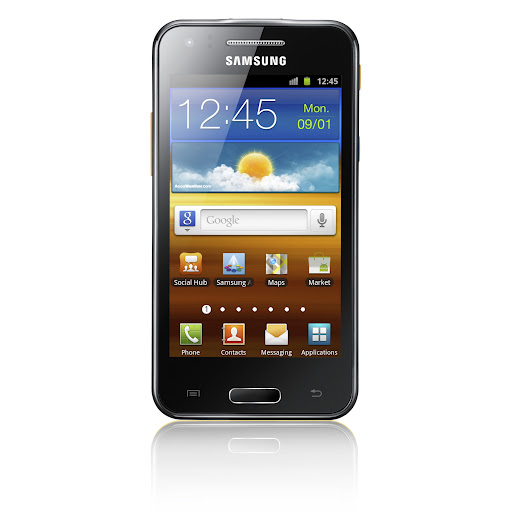
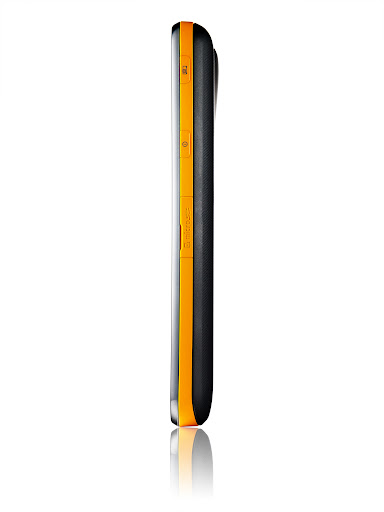
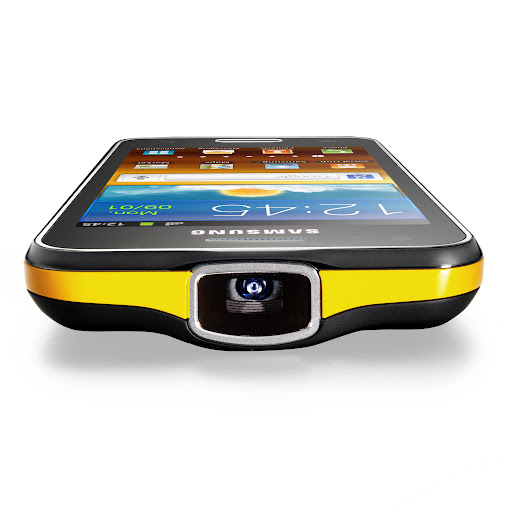
From Droid Life: Samsung Introduces the Galaxy Beam – It’s a Phone with a Built in Projector, That’s Actually Pretty Cool

The other announcement from Samsung so far at MWC - aside from the disappointment Galaxy Tab 2 (10.1) – is an interesting phone, to say the least. It’s called the Galaxy Beam and includes everything that you have come to expect from a smartphone now a days, but Sammie then packed a projector inside. That’s not a type-o. This phone actually has a real projector inside that can project video, pictures, or other media onto just about any wall or flat surface. Think about that for a second. Wherever you are with this phone, you can essentially beam a 50″ representation of your screen onto a wall. It’s tough to tell how locked up the feature is, but I’m just imagining what devs could potentially do with this.

Other than the projector, the Beam sports a dual-core processor, 6GB of RAM (that’s what the spec list says and has to be an error), 5MP camera, front camera, 4″ WVGA display, 2000mAh battery, and Gingerbread. It’s no HTC One X, but it’s not bad.

Is anyone even slightly interested? Projector, baby?

Share the Fun with Samsung GALAXY Beam

February 26, 2012

Samsung’s projector smartphone offers unforgettable shared experience for playing multimedia content anytime, anywhere

Barcelona – February 26, 2012 – Samsung Electronics Co., Ltd, a global leader in digital media and digital convergence technologies, today introduced Samsung GALAXY Beam, the projector smartphone that allows users to display and share multimedia content anywhere on a large luminous projector screen.

GALAXY Beam lets users spontaneously share photos, videos or other digital media with family or friends by beaming content stored on the device directly onto walls, ceilings or improvised flat surfaces, so that everyone can share the fun without the need to huddle around smartphone or pad-sized screens. GALAXY Beam’s ultra-bright 15 lumens projector allows users to freely share life’s memorable moments instantly and in crisp clarity, even in outdoor environments.

“GALAXY Beam provides mobile freedom, enabling a unique shared experience around digital content for everyone—anywhere and instantly—from a smartphone as slim and portable as any on the market,” said JK Shin, President of IT & Mobile Communications Division at Samsung Electronics.

“GALAXY Beam is a device borne out of Samsung’s insight and innovation, demonstrating Samsung’s commitment to providing extraordinary experiences for consumers with products that let them express and fulfill themselves.”

Video clips, maps, business information, games – a whole range of multimedia content can be beamed instantly by GALAXY Beam on a crisp, high-definition projection up to 50’’ wide. The device features a projector-dedicated application which makes it easy to select content and activate projection in a few simple steps.

Add a dose of ambience or entertainment to a friends’ gathering by transforming any household room or outdoor deck into an instant mini home-theater, projecting full-screen video clips on a ceiling or wall for common sharing, at the touch of a button. Or capture your favorite holiday moments using the GALAXY Beam’s 5MP camera, then display a full photo slideshow to family members on a dining room wall while playing accompanying music straight from the device, so that everyone shares the experience.

For young users who depend on constant, immediate socializing of digital content and entertainment, GALAXY Beam introduces a new way of sharing. It becomes much more than a phone—a handy digital tool, deployable anywhere, which can add visual entertainment to a simple street gathering, set the mood for a small party, or simply turn life’s moments into something personally and immediately sharable. With GALAXY Beam, a birthday or anniversary party can be enlivened in seconds by sharing YouTube or Hulu music videos straight onto a ceiling or door. Likewise, students can collectively share videos or study-work in any dormitory room or student lounge, turning group study into a whole new interactive experience right from a desk table or from the palm of their hands. GALAXY Beam is also ideal for action-packed interactive gaming: Users can upload their own games or choose from over 1,000 games available via Game Hub, Samsung’s dedicated virtual gaming store, then project games to co-players or observers to turn gaming into an unbeatably interactive, shared experience. Additionally, GALAXY Beam is convenient tool for mid-sized business workers. An estate agent can beam images of candidate properties to customers as they tour them; or an architect can display draft concepts or designs to co-workers on the spot at a building site or public location.

Despite featuring a full built-in projector, the GALAXY Beam does not compromise on style or portability, measuring just 12.5mm thick and featuring an elegant, ergonomic design. It runs on Android 2.3 Gingerbread which is powered by an impressive 1.0GHz dual-core processor, ensuring great versatility and a highly responsive user interface. An impressive 8GB of internal memory allows ample multimedia storage without compromises, and a powerful 2000 mAh battery ensures greater display power and content freedom.

The GALAXY Beam is exhibited at Samsung stand (Hall 8), Mobile World Congress 2012. For multimedia content and more detailed information, please visitwww.samsungmobilepress.com.

from Droid Life

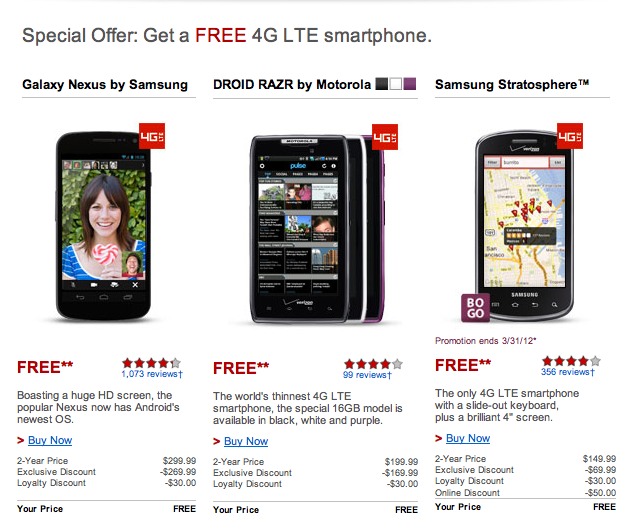
From Droid Life: Verizon Offering Significant Discounts to “Loyal” Customers, How Does a Galaxy Nexus for Free Sound?

If you have been a long-time Verizon Wireless subscriber and have an upgrade available in the near future, checking your inbox would be recommended. Big Red is sending out emails under their loyalty program that are significant. We are talking significant as in free. As you can see from the part we cropped out of the email, VZW is willing to hand you a $299 Galaxy Nexus for nothing, as long as you sign a new 2-year contract. For most current customers, a $50 discount is the max.

Tough to tell who qualifies, but it may be worth a call to Verizon’s sales team to see if you do.

Cheers Scotty!

from Droid Life

From Droid Life: Chrome Extension Lets You Download Android App Apks Directly From the Market to Your Desktop

Click here to view the embedded video.

When developer redphx sent over his latest creation last night – a Chrome extension that would allow you to download .apk files directly from the Android Market to your desktop – we had two immediate thoughts. The first, “Wow, this is actually really cool and could be useful down the road.” The second was, “While it’s cool and all, how frowned upon by Google and developers is this going to be?” And the reason I asked myself that second question is because pulling an installed .apk file from your phone isn’t normally the simplest procedure (and probably for a few good reasons).

In most cases, a user needs to be rooted and have the understanding of where to look on their phone in order to accomplish the task. We would assume that this is made difficult to help stop piracy, protect users’ security, and to not let applications float freely around without control. This Chrome extension changes all of that. All you need to do is install the extension, give it a bit of device info and a legit Market login and you can start ripping .apks. Paid applications cannot be downloaded unless the Market login you gave had already purchased the app. So this isn’t a way to get paid apps for free, it’s just a way to get the .apk file without any fuss.

It’s not all bad though. How many times have we posted up a new app that was only available to select devices? Most of the time these apps can run on other phones, but the developer has only optimized them for a select few. This extension would give you to the opportunity to try out those apps even if the Market, your carrier, or developer has decided that you shouldn’t. Take Google Wallet for example. No need to use our browser trick if you have this extension installed.

So if this interests you, keep in mind that it asks for some bits of info that not everyone will be comfortable dishing out – like your device ID and Gmail login info. This is all apparently stored on a cookie that is only on your PC, but still, proceed with caution. You also have to tweak some Chrome security settings.

And yes, it works.

More Info:  Apk Downloader Page


from Droid Life