As extreme weather events become ever more common, climate risks are playing a role in many people’s long-term decision-making. And few things are more long-term than buying real estate. In response, Zillow has announced a new partnership to bring climate risk information to its for-sale listings.
Property listing pages in the US will include data about flood, wildfire, wind, heat and air quality risks at that location. This section will also list any climate-related insurance requirements for that property. The information is being provided by First Street, a specialist in climate risk financial modeling. The climate data is rolling out this year to the Zillow website and iOS app, while Android is expected to get the update early next year. Some locations have already been updated to show climate data on the web.
Those five risk categories are also being applied to Zillow’s interactive map search view. Each of the different climate concerns has a color-coded visualization to show the risk levels across the country or in a smaller region. It’s valuable information for anybody in a position to make that big homebuying leap. For everybody else, it may add simply a touch of gloomy reality to the gleeful experience of scrolling through absurd and/or overpriced houses.
Zillow also introduced improvements to its AI search feature earlier this month.
This article originally appeared on Engadget at https://ift.tt/MmbzEdq
Scientists have unveiled the most extensive map of clouds on Mars ever created.
For the past 20 years, the European Space Agency’s (ESA) Mars Express spacecraft has photographed Martian clouds and storms, documenting how they shape into striking patterns despite the planet’s very thin atmosphere. This summer, scientists at the German Aerospace Center pieced together thousands of images taken by a camera on board the spacecraft into a "Cloud Atlas" that takes you on an immersive virtual tour of Mars’ clouds.
Understanding how and where on Mars these clouds form is crucial to deciphering their impact on the planet’s climate. The new catalog documents a variety of cloud patterns, including some unlike anything seen on Earth.
"Clouds on Mars are just as diverse and fascinating as those we see in our skies on Earth," Daniela Tirsch, a planetary geologist at the German Aerospace Center, said in a statement. She presented the new atlas Sept. 10 at the Europlanet Science Congress in Berlin. "We also see impressive dust clouds that can spread hundreds of kilometers," Tirsch said — a phenomenon we don’t experience on Earth."
An example of cloud streets over Vastitas Borealis, a large area near the North Pole mostly devoid of craters (Image credit: ESA/DLR/FU Berlin/A. Cowart)
Unlike Earth’s liquid-water clouds, Martian clouds are primarily carbon dioxide because moisture in the planet’s air is so low, all of it would add up to a layer thinner than a strand of hair. Sometimes, dust and water vapor also blend in, helping craft linear rows of clouds like those spotted hovering above a vast swath of lowlands near Mars’ north pole known as Vastitas Borealis.
The Mars Express spacecraft imaged similarly extensive cloud streets elsewhere on Mars, including around Olympus Mons, Arsia Mons and several other volcanoes in the Tharsis region near the equator. "While they resemble cumulus clouds on Earth, they are formed under different atmospheric conditions," Tirsch said in the statement.
Breaking space news, the latest updates on rocket launches, skywatching events and more!
This elongated cloud has formed as a result of wind encountering the Arsia Mons mountains. It forms almost every day during a specific season, from early morning until noon. (Image credit: ESA/DLR/FU Berlin/A. Cowart)
The elongated wisp of water ice has formed every spring on southern Mars, and it becomes visible in the early morning and lasts until noon every day for at least 80 days. Within hours, the cloud spreads at a mind-boggling speed of 370 mph (600 km/h). At its largest, it spans more than 1,100 miles (1,800 kilometers) long and 90 miles (150 km) across, stretching from Arsia Mons all the way to the more famous Olympus Mons, the largest volcano in the solar system.
Although the AMEC repeatedly forms over a volcano, scientists have long ruled out that it’s any sort of volcanic event, because spacecraft never detected spikes in methane, sulfur dioxide and other gases known to spew from volcanic eruptions. Instead, the cloud results from the way local winds interact with the surface features. It forms when water-ferrying winds are nudged up the flanks of Arsia Mons to higher, much cooler altitudes, where some of the moisture in them condenses.
"Understanding this cloud gives us the exciting opportunity to try to replicate the cloud’s formation with models — models that will improve our knowledge of climatic systems on both Mars and Earth," Agustin Sánchez-Lavega, a professor at the University of Basque Country in Spain who co-authored a 2020 study explaining the cloud’s dynamics, said in a previous ESA statement.
Wind-lifted dust clouds left hanging in the air
Seemingly parallel white lines are Martian clouds sculpted by gravity waves, while the splotches of brown are wind-lifted dust clouds left wafting in the air due to seasonally sharp differences in temperatures and pressures. (Image credit: ESA/DLR/FU Berlin)
The image above shows a striking cloud pattern sculpted by gravity waves, which are common ripples in both Mars’ and Earth’s atmospheres caused by air trying to restore itself to equilibrium. On Mars, they are typically spotted at midlatitudes in the winter; NASA’s Curiosity rover recorded the first ground-based views of such clouds back in 2017.
A special type of gravity cloud is a lee wave, a recurrent ridge-like cloud pattern that builds on the downwind side of mountains across Mars. Depending on the shape of its obstacle, this type of cloud takes on slightly different geometries, scientists say.
Join our Space Forums to keep talking space on the latest missions, night sky and more! And if you have a news tip, correction or comment, let us know at: community@space.com.
Bose released the Ultra Open Earbuds earlier this year which looked more like jewelry from the future than earbuds. We liked them for their innovative design, great battery life, and excellent sound with minimal leakage. They’re also immensely comfortable—to the point where you could forget that you’re wearing them.
The company just gave one of our favorite open-ear buds a functionality that, if works exactly as promised, is pretty impressive, but there’s a slight caveat to it, too.
When you pair the Ultra Open with the Bose Smart Soundbar, the buds will double as the rear surround speakers in a traditional surround sound set-up. And since they sport an open-ear design, you’ll still be able to listen to the audio emanating from the soundbar. So, the soundbar is still your primary speaker in this setup, and the buds will complement the experience by adding another directional audio output.
The good thing about this is you won’t have to invest in extra speakers or worry about the physical space they would take in your lounge. The downside is that they’re unlikely to sound better than a standalone set of rear speakers.
Also, this setup only works if you use the Ultra Open with the $499 Bose Smart Soundbar, not the company’s entry-level $279 Bose TV Speaker soundbar, and not even with its higher-end offering, the $899 Smart Ultra Soundbar. This means you need a minimum investment of $800 (Ultra Open plus the Smart Soundbar) to enjoy the feature.
The Smart Soundbar is Bose’s refresh of its already existent Smart Soundbar 600 with a new feature, the AI Dialogue Mode. Debuted on the Smart Ultra Soundbar last fall, the mode tweaks the speaker’s audio stream in real time as soon as it detects speech in the content it’s playing. This guarantees improved clarity and promises to make sure the dialogue in your content isn’t taken over by the loud, overpowering background music.
The caveat on Bose’s new surround sound feature reminded me of Sonos limiting its latest Ace headphone’s audio swap feature to its high-end $899 Arc soundbar which defeats half the purpose of touting the feature on a $450 pair of headphones.
Bose’s new Gen 2 QuietComfort Earbuds join the soundbar refresh and surround sound upgrades. Priced at $179, these come with a lot of the same features the Gen 1s offered such as ANC and customizable gestures, but add one new functionality. With their new Remote Selfie feature, you can turn them into a remote camera trigger by telling them “Hey headphones” as soon as you’re done striking a pose. Your buds will instantly take a photo in your camera app.
Tile trackers have an odd reputation. For one, they’ve long been Apple’s main competitor for its AirTag Bluetooth trackers. At the same time, those tags have run up against accusations they facilitate stalking, even more than Apple’s ultra-popular tracker. Device maker Life360’s latest Tile trackers now have a button to alert your friends if “something is wrong.”
The new trackers have a multi-function button that can alert the users’ friends and the SOS function in the Tile app if “something is wrong.” Press the button three times, and it will send a notification describing your emergency to contacts designated in the Life360 app. If you want your tracker to contact emergency services for you without needing to dial 911, you’ll need to pay for a Gold or Platinum Life360 app subscription for $15 or $25 a month. Those subscriptions also net you a free tracker and other benefits like crash detection.
The company unveiled its first new trackers since Life360 first bought up the brand in 2021. They include a $25 Tile Mate and a $35 Tile Pro with a louder ring and a 500-foot range compared to the previous Pro’s 400-foot range. There’s an additional wallet-sized Tile Slim and a $25 Tile Sticker. As the name suggests, the sticker can purportedly attach to anything and allow for Bluetooth tracking on practically anything.
Ever wanted to track where you put your portable power bank? The sticker might be a good option. All of them are available starting Monday. The SOS features seem interesting, but despite the new built-in panic, it won’t do much to stop the accusations that Tile has been pretty lax with its anti-tracking efforts.
Tile has been on-again and off-again in its efforts to deter stalking with its trackers. The company rolled out anti-tracking software back in 2022. Like Apple’s AirTag scanning, the “Scan and Secure” feature lets Life360 users search for unwanted tags on their person, though you need to go through the app. The company then implemented another feature that allowed users to make their tags invisible, hiding the trackers from its own scans. To enable the invisible trackers, users needed to offer up biometric data and consent to a potential $1 million lawsuit if they were convicted of stalking. At the time, Life360 claimed the loophole in its anti-stalking initiative was to help users recover stolen items.
“Unlike competitors like Airtags and upcoming products compatible with the Google Find My Device Network, Tile doesn’t alert thieves if they steal an item with one of our trackers,” Tile claims in its press release about its Anti-Theft mode.
Last year, two women in Texas who say they were stalked with the help of a Tile tracker helped file a class action lawsuit against the company. The pair of alleged stalking victims claimed the tracker maker “marketed its product both explicitly and implicitly for the purpose of tracking people—particularly women.” In response, Tile says it does not condone stalking with its trackers and works with law enforcement when those cases crop up. The company also claimed at the time it had received no reports of misuse of its anti-theft mode. That case is ongoing, and Tile’s attorneys has argued that the case should be moved into arbitration.
So the new tags still don’t help anybody concerned they’re being hounded with the help of a Tile tracker. Still, for many people—especially women—who dread electronically-enabled stalking, then it could prove a substantial, though incredibly ironic, peace of mind.
For PC gamers, Steam has been such a mainstay for so long now that it’s practically melded into the operating system itself. The thing is, Steam is more than just a market — it can do a lot more.
Just because you’ve used Steam a lot doesn’t mean you know everything about it. Valve has continued to update its flagship product over the years with several intriguing and downright useful features, and it’s a real shame that many of those features fly under the radar.
So, I dug through some of Valve’s recent announcements and explored the software from end to end. Here are some cool Steam features I found that you might’ve overlooked.
Play Steam games on your TV or phone
Steam is a PC gaming platform, but you aren’t limited to your PC. With Valve’s own Steam Link app, you can stream games from your PC to compatible devices including phones, tablets, and TVs.
All you have to do is install Steam Link on the device you want to play on (e.g., your TV or phone) and connect via Steam Link to your gaming PC. This connection can be made over local network or the internet, meaning you can actually play your games even when away from home.
What actually happens is that your inputs are sent to your PC, which runs the actual game, and the game’s visual output is streamed to your device in real time. It’s basically a cloud gaming setup, except your own PC is the cloud service in this case.
If you want to get even more technical with a full-blown DIY project, you can even build your own Steam gaming console for your TV, which is what PCWorld’s own Will Smith did just for funsies. I won’t pretend to know exactly how he did it, but the end result is impressive.
See how much you’ve spent on Steam
Bragging about how many unplayed games you have in your Steam backlog is so 2010s. How about bragging about the ungodly amount you’ve spent on games, played or not?
If you want to pull back the veil and find out how much of your future retirement fund you’ve frittered away on your gaming library, then Steam has the stat loaded and ready for you.
Navigate to Help > Steam support > My account > Data related to your Steam account > External funds used and you’ll see a breakdown of your total spend over the life of the account. Ouch.
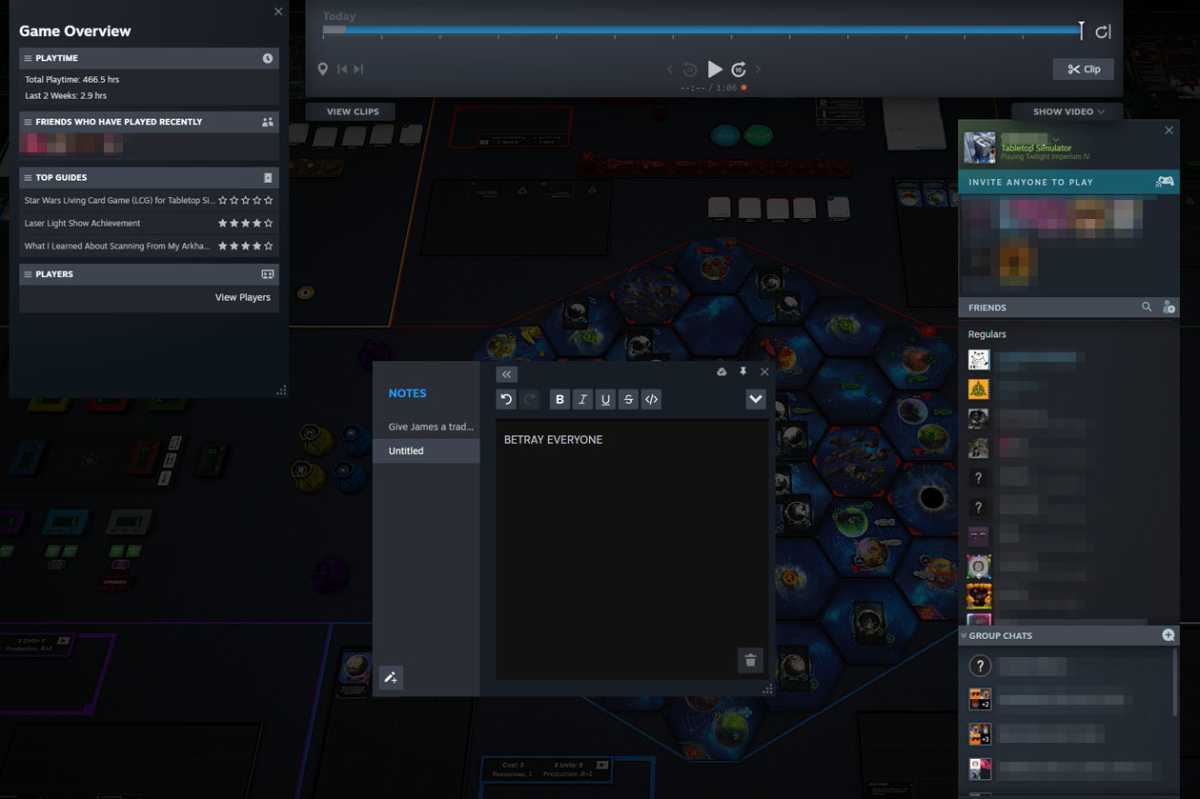
It’s basically a notepad that you can access through the Steam overlay (open the overlay using the Shift + Tab shortcut), and you can keep notes on a per-game basis. It’s where I store my strategic plans for complicated games on Tabletop Simulator, and it’s where I leave myself reminders for what I want to do next in Kerbal Space Program.
And Steam Notes can hold more than just text. You can make links to webpages, you can write code, and you can even paste images. (Copy the image you want and paste it in using Ctrl + V.)
You can then access Steam Notes outside of the game itself. Navigate to the game in your library, then scroll down and look at the right-hand side of the Steam window. You’ll find the Notes tab with everything you’ve written and/or pasted there.
Share Steam games with friends and family
Valve
Valve
Valve
Do you ever feel like the games in your Steam library are going to waste, either because you’ve yet to play them or you’ve completed them and have no intention of ever playing them again? Consider sharing those games with friends and family so they can play them!
Steam Family is a nifty feature that lets you share your game library with up to five other people. Games are shareable on a game-to-game basis (must be enabled by each developer), and a shared game can only be played by one person at a time. Each person in your Steam Family is designated as either an Adult or Child, with special parental controls that can limit access to certain games and Steam features for Children.
To share Steam games with someone, both of you need Steam Guard enabled on your accounts. Then, go to Steam > Settings > Family, enable Activate family library on this device, then select the account you want to share your library with from the list. To play a shared game, the borrower must select Borrow on the game in their library, and then the owner must approve the borrow request.
Use custom controller configs per game
If you prefer to game on your PC with a gaming controller instead of keyboard and mouse, you should know that you can download and use custom controller presets created by the community on a per-game basis. These presets may be better than the defaults.
To use these controller configs, go to Steam > View > Big Picture Mode. Then, in your game library, select a game and click on the controller icon beside it. Click on the current controller layout and you’ll be able to browse both official and community-made configs.
Customize your Steam library art
Don’t like the logo of a particular game? Wish the background wasn’t so ugly and want to tweak it? Or maybe you want to revamp the art for every game in your Steam library as a form of creative expression? You can!
All you have to do is open your Steam library, select the game you want to change the art for, then right-click the background image in the main window and choose the image you want to replace it with.
This can be a great way to, say, add your favorite personal screenshots as a backdrop or simply to customize logos for readability. SteamGridDB has some amazing fan-made artwork you can use to replace the defaults, if you aren’t creative and/or want something professional-looking.
Sell Steam Trading Cards for wallet funds
Jon Martindale / IDG
Jon Martindale / IDG
Jon Martindale / IDG
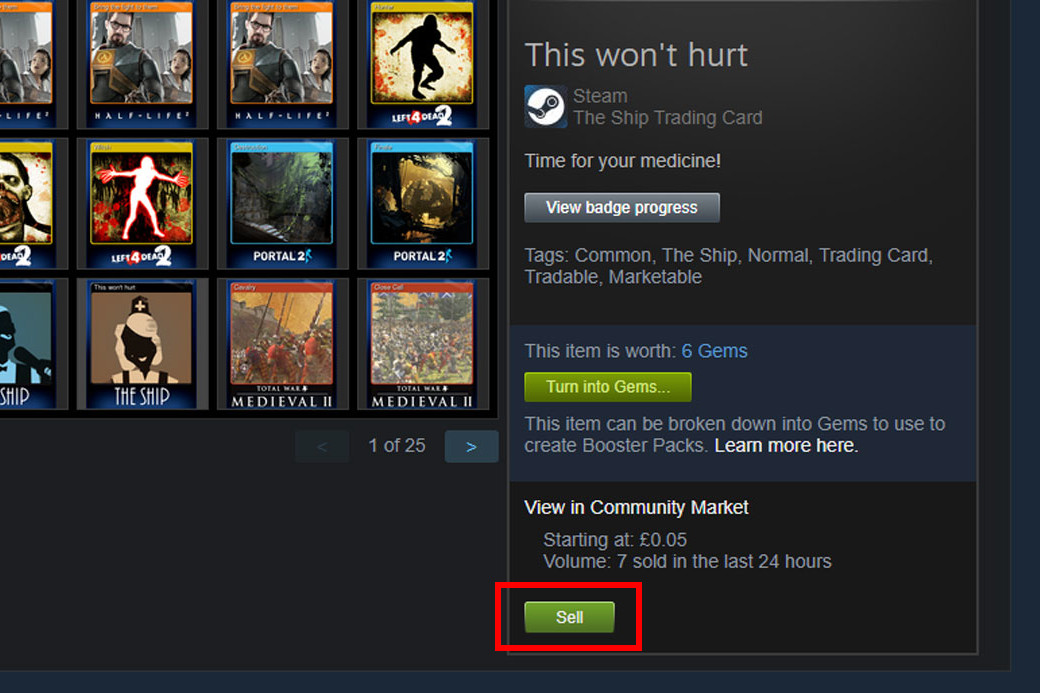
Frankly, I don’t care about Steam Trading Cards, and I know I can’t be the only one. There’s nothing wrong if you like them, of course — and it’s actually better for me that people want them because it allows me the opportunity to sell them for money.
If you want to get rid of your Steam Trading Cards, simply click on your account name in Steam and select Inventory. Then, select all of the trading cards you don’t want (for me, that’s all of them) and hit the Sell button to sell them on the open market at a fair price.
They might not sell straight away, but they should go eventually — and before you know it, you’ll have a few extra dollars to spend on a new game or DLC that’s sitting in your wishlist.
Record video footage of your sessions
If you want to record video of your gameplay, you have options as far as what software to use — but why not just use Steam itself? Earlier this year, Valve released a useful game recording feature that’s free to use and built right into the Steam client for ultimate convenience.
To enable it, you’ll need to be running the beta version of Steam (at least at the time of this writing). To switch to the beta version of Steam, you can simply go to Steam > Settings > Interface, then select one of the beta options from the drop-down menu.
After Steam restarts in the beta branch, navigate to Steam > Settings > Game Recording, then select either Background (to record constantly in the background, up to the limits you set for time and storage) or On Demand (to only record when you manually toggle it).
You can add timeline markers to help you keep track of important moments, you can clip the footage, and you can share those clips, all from within the Steam interface. Just open the Steam overlay (again, that’s Shift + Tab in game) and start cutting up your highlights.
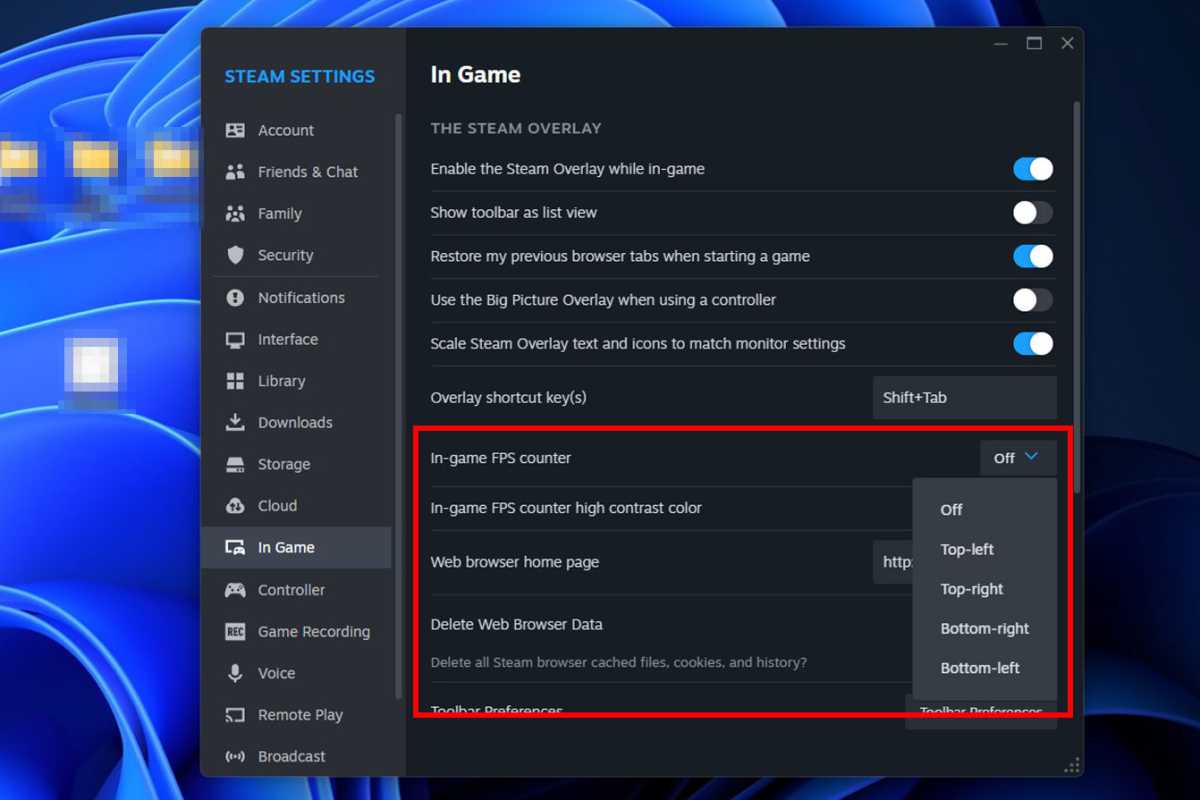
This particular feature has been in Steam for a while, but I’ve written enough “How to check your in-game FPS” guides to know that it’s still something that many aren’t aware of. Steam may not be the best tool for checking frame rates, but it is the quickest and most straightforward.
Navigate to Steam > Settings > In game, then enable the In-game FPS counter. It’ll display a simple average frame rate at the top of your screen, which is good enough for most cases. (If you don’t see it, make sure you haven’t disabled the Steam overlay from showing in-game.)
Change Steam’s start page
Suppose you find yourself spending way too much on Steam games and you want to eliminate as many temptations as you can. One thing you can do is change Steam’s start page so you aren’t bombarded with sales, offers, and new releases.
To change Steam’s start page, go to Steam > Settings > Interface, then select one of the options for how you want Steam to start up. The options include News, Library, Community Home, and (if Steam is a crucial aspect of your online social life) Friend activity.
Scroll to find hidden gems you’d like
After Steam’s latest user interface overhaul, Valve introduced a lot more recommendations for your next purchase — and this is a great way to find hidden gems, even if you have an expansive wishlist already.
All you have to do is navigate to the Store page, scroll down, and just keep scrolling down. You’ll see the usual special offers and featured games at the top, but keep going and you’ll enter into the weeds where you can find all sorts of lesser-known titles.
These recommendations are based on various factors, including the games you actually play, the games your friends have been playing lately, games from your wishlist that were recently updated, and some truly niche picks from niche categories that Steam thinks you’d like.
While writing this article, I kept scrolling just to see what Steam thinks I’d like and ended up finding a bunch of “underwater games” and “wholesome games,” which I apparently have a penchant for!
California firefighters needed to spray 50,000 gallons of water to extinguish a roadside Tesla Semi fire, the US National Transportation Safety Board (NTSB) announced in a preliminary report. Crews also used an aircraft to drop fire retardent in the "immediate area as a precautionary measure," according to the agency.
The crash happened at 3:13 AM on August 19 on the I80 freeway east of Sacramento. The tractor-trailer departed the roadway while navigating a curve, struck a traffic delineator and eventually hit a tree. The driver was uninjured but taken to hospital as a precaution.
California Highway Patrol
The Tesla Semi’s large 900kWh battery caught fire and reached a temperature of 1,000 degrees F while spewing toxic fumes. It continued to burn into the late afternoon as firefighters dowsed it with water to cool it down (Tesla sent a technical expert to assess high-voltage hazards and fire safety). It wasn’t until 7:20 PM (over 16 hours after the crash) that the freeway was reopened.
All of that caught the attention of the NTSB, which sent a team of investigators, mainly to examine the fire risks posed by large lithium-ion battery packs. The agency — which can only make safety recommendations and has no enforcement authority — said that "all aspects of the crash remain under investigation while the NTSB determines the probable cause."
Given the long road shutdown time, dangerously hot fire and toxic fumes, the accident is likely to provoke a lot of discussion in and out of government. The NTSB concluded in 2021 that battery fires pose a risk to emergency responders and that manufacturers’ guidelines around such fires were inadequate.
This article originally appeared on Engadget at https://ift.tt/gloYcD6
Gemini Live, the feature that allows you to have a live conversation with AI, is going to free to use for Android users via the Gemini app. Initially launched exclusive to Gemini Advanced users, now even those not paying for advanced features can get in on the fun.
We won’t make any assumptions as to why Google has made this decision, but could it be possible that it’s because the company feels there aren’t enough people willing to pay for it? Who knows. The only important thing is that it’s now free to use in the Android app and that’s pretty sweet.
We’re starting to roll out Gemini Live in English to more people using the Android app, free of charge. Go Live to talk things out with Gemini, explore a new topic, or brainstorm ideas. Keep an eye out for Gemini Live in the Gemini app ? pic.twitter.com/0VL0c7E6Gw
According to Google, “people are finding this natural way of conversing with Gemini so much more engaging that since launching, we’ve seen that Live conversations are 2.5x longer than text-based conversations.”
I myself will be giving this a try as son as it’s live in my Gemini app. Thanks, Google!